New features, improvements and fixed issues, as they reach your account.
113 updates in total
ImprovementTop Funnel
Repeat orders get correct credit
Orders placed again within a day now inherit the first order's source.
When a customer places a second order within the same visit as an earlier one, that order now automatically inherits the first order's traffic source — so you see where the customer really came from, instead of an empty or guessed source. The repeat order's timeline no longer shows a misleading "First touch" badge for a source that actually belongs to the earlier order.
Available onStartupBusinessCorporationEnterprise
ImprovementTop Funnel
Smarter order source detection
Orders now show where the buying conversation truly began, not just the last touch before purchase.
Order attribution now identifies the touchpoint where the buying conversation started, rather than always crediting the last touch before purchase.
Available onStartupBusinessCorporationEnterprise
FeatureBetaOperations
We integrate with Grok
Ask Grok about your business performance
Grok connector is in beta
You can now connect Grok to your store data.
This makes it easier to bring your store's data into the AI tools your team already relies on, instead of being limited to a single assistant.
Available onStartupBusinessCorporationEnterprise
IssueSignals
Fixed false re-engagement alerts
Re-engagement alerts no longer fire for customers who have already placed a new order.
We fixed an issue where re-engagement alerts could tell your team to chase a customer who had just ordered. This happened when the customer's order history hadn't finished refreshing yet, so the alert still pointed to their older order.
Now, before any re-engagement alert is sent, we check for a newer order first and skip the alert if one exists. This means your team can trust that these alerts always reflect the customer's latest activity.
Available onStartupBusinessCorporationEnterprise
FeatureTop Funnel
New ChatGPT ads integration
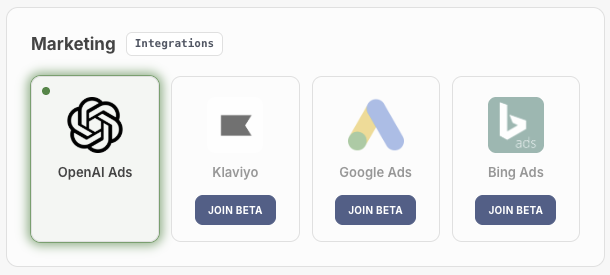
OpenAI (ChatGPT) Ads platform is natively supported.
OpenAI Ads platfrom integrated
Ads inside ChatGPT are a new way to reach buyers, and many merchants are testing them right now.
The tricky part is knowing whether they work. A shopper sees your ad mid-conversation, comes back to your store a day later, and buys. Without the right connection, that sale lands in your reports with no link to the ad that started it.
Our OpenAI Ads integration connects those dots for you.
Setup takes under 5 minutes. If you already advertise with OpenAI, connect your account and you're done.
Every sale is tied to a campaign. You see which campaigns bring in more than they cost, and which ones are draining your budget.
No tracking pixel to install. We handle the tagging behind the scenes, so there's nothing for you or your developer to add to your site.
Smarter targeting from data you already have. We use your existing customer and order history to enrich your campaigns, so your spend reaches buyers more likely to convert.
Available onStartupBusinessCorporationEnterprise
ImprovementTop Funnel
ChatGPT ad clicks tracked as paid traffic
Clicks from ChatGPT ads are now recognized as paid traffic in your reporting.
We now recognize OpenAI's ad click token so clicks from ChatGPT Ads are correctly classified as paid traffic, even if the link is missing the usual paid-traffic tags and attribution.
This means your attribution reports show ChatGPT Ads activity accurately instead of mixing it in with organic traffic.
Available onStartupBusinessCorporationEnterprise
ImprovementSales
Fewer repeat live shopping alerts
Live Shopping Assist alerts now wait a full day before repeating for the same customer.
Live Shopping Assist alerts (Signal 59) used to be able to fire again for the same customer every four hours, which meant a shopper browsing on and off through the day could trigger up to six alerts. We've increased the cooldown to a full 24 hours.
Your team now sees at most one Live Shopping Assist alert per customer per day, cutting down on repeat notifications for the same shopper.
Available onStartupBusinessCorporationEnterprise
ImprovementSales
Alerts close automatically after contact
Cart and live shopping alerts now close on their own once your team reaches the customer.
High Value Cart, VIP Cart, Re-engagement, and Live Shopping Assist alerts now close automatically the moment your team reaches the customer by call, text, or email. The manual "Customer Contacted" button has been removed since it's no longer needed.
This keeps your alert queue accurate without extra clicks, and the system is better at recognizing when a call, text, or email actually reached the customer rather than just going out.
Available onStartupBusinessCorporationEnterprise
FeatureSales
Company shipping addresses tab
The company panel now has an Addresses tab listing every place a company's orders have shipped to, with the most recent delivery pinned at the top.
Open any company's detail panel and you'll find a new Addresses tab that lists every address their orders have shipped to, sorted by how often each one is used. The most recently used delivery address is pinned in a highlighted card at the top, so during a call you can read back "the usual address" without hunting through the list.
Each address includes a copy button that formats it ready to paste into a quote, making it quick to reuse without retyping.
Available onStartupBusinessCorporationEnterprise
ImprovementSales
Cart activity folds into one row
Rapid bursts of cart adds, removals, views and checkout steps now collapse into one row in a shopper's journey.
When a shopper makes a lot of cart changes in a short time, the journey timeline used to show a long wall of near-identical lines. Three or more cart steps in a row now collapse into one expandable row, matching how page visits and email threads already appear in the timeline.
Open the row to see every step underneath, including removals and checkout events that used to get buried. This makes it much easier to follow what actually happened during a busy shopping session.
Available onStartupBusinessCorporationEnterprise
FeatureSales
Alert credit follows replaced orders
When a cancelled order is quickly replaced, its alert credit now carries over, and alerts that fired before an order's window are shown with context.
Sometimes a sale has to be taken twice, for example after a card decline, and the first order gets cancelled while a replacement goes through within a day. The cancelled order's alert credit now carries over to the replacement, so the sale is still credited to the alert that started it. The journey shows this as "replaced by #order" next to the alert.
We also now show alerts that fired before the start of an order's timeline, with a note explaining they fired before a previous order, so the full picture stays clear instead of looking like a gap.
Available onStartupBusinessCorporationEnterprise
ImprovementOperations
Faster updates for cancelled orders and refunds
Cancelled orders and refunds now show up in your store data within seconds instead of waiting for the next scheduled check.
Order cancellations and refunds used to wait for a once-a-minute check before showing up in your data. They now update almost immediately after they happen in your store.
This means your reports, alerts and carts list reflect cancellations and refunds faster and more reliably.
Available onStartupBusinessCorporationEnterprise
ImprovementSales
Redesigned carts list
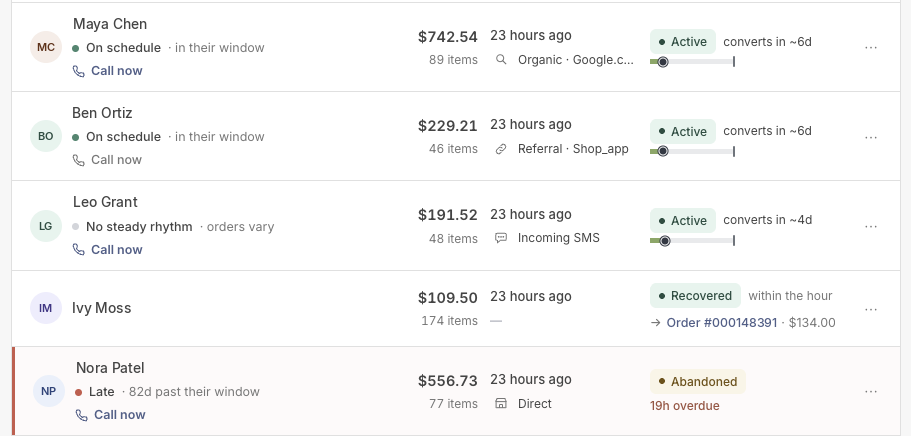
The carts list now leads with the shopper, shows buying rhythm and the best way to reach them, and recognizes calls, emails, texts and Private Shopper as cart origins.
New cart list alyout
Your carts list now puts the shopper front and center, showing their buying rhythm and the best way to reach them at a glance. We've also expanded what counts as a cart's origin: calls, emails, texts, and Private Shopper (for shoppers who blocked tracking) are now all recognized, so more carts show where they really came from.
Texts are now tracked as customer activity behind the scenes too, so a shopper's text conversations show up alongside their other touches when attributing an order.
Available onStartupBusinessCorporationEnterprise
IssueSales
Cleaner cart data
Guest carts with no name, email, or phone are no longer saved as mysterious entries.
Carts started by a visitor who never gave a name, email, or phone number are no longer kept in your cart data. These carts had no way of being tied to a real shopper, so they just cluttered the list with unidentifiable entries.
Any cart that is tied to a known customer, has a recovered order, or needs to be kept for other reasons is never affected. The result is a cleaner, more useful set of carts to review.
Available onStartupBusinessCorporationEnterprise
ImprovementTop Funnel
Browsing history grouped into runs
Long stretches of page views in a customer's journey now collapse into a single expandable row.
When a shopper browses several pages in a row, their journey timeline now shows one collapsible row instead of a long list, matching how email threads and text conversations already group together. Opening the row still shows every page they viewed.
This cuts down on clutter in busy journeys so you can spot the moments that matter, like cart adds, calls, or emails, without scrolling past dozens of individual page views.
Available onStartupBusinessCorporationEnterprise
FeatureSales
Live Shopping Assist alerts
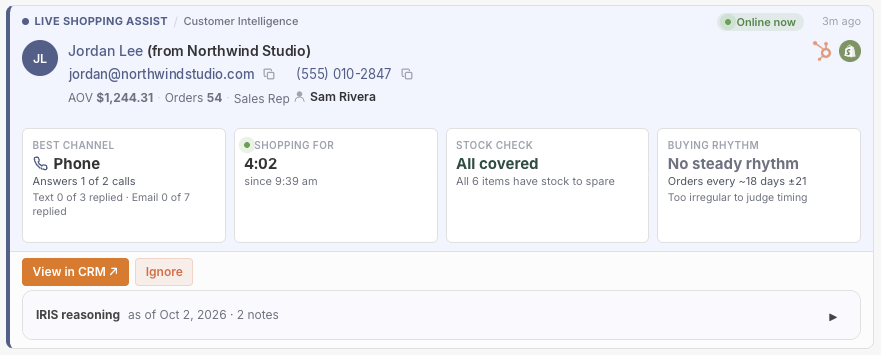
A new alert flags when a returning shopper is live on your site with items in their basket, and tells a rep exactly how to help them.
Live Shopping Assist signal
When a customer who shopped with you before comes back and has items sitting in their basket, IdealData now raises a Live Shopping Assist alert while they're still on the site. The card shows the best way to reach them (call, text, or email), what they're shopping for and how long they've been at it, whether you can actually ship what's in their basket right now, and where they stand in their usual buying rhythm.
This gives your team everything needed to decide whether, and how, to reach out while the shopper is still active, instead of guessing or missing the moment. The alert only fires on genuine return visits, and once it closes it records how long the shopper was browsing.
Available onStartupBusinessCorporationEnterprise
ImprovementSales
Texts show customer name
Incoming texts in a customer's journey now show who sent them instead of which line received them.
Incoming text messages shown in a customer's journey now display the shopper's name (for example, "by Jane Smith") instead of the store line the text arrived on. When a name isn't available, the text reads "by the customer" rather than showing a blank.
Since incoming texts always come from the customer, showing their name makes the conversation easier to follow at a glance.
Available onStartupBusinessCorporationEnterprise
IssueSales
Fixed call alert quiet period timing
Fixed an issue where dismissing a call alert could reset the wait time using the wrong settings.
We fixed a bug where dismissing a "best time to call" alert could restart the quiet period using settings that didn't match your store's own configuration. This could leave your team waiting longer than expected before seeing a new alert for the same shopper.
Dismissals now always use your store's own wait-time setting, so quiet periods behave exactly as you've configured them.
Available onStartupBusinessCorporationEnterprise
FeatureSales
Private Shopper label on orders
Orders from shoppers who blocked tracking are now clearly labeled Private Shopper in your orders list and order details.
When a shopper opts out of tracking or blocks it, their order previously showed no source at all. These orders are now labeled Private Shopper in both your orders list and the order details panel, so you can see at a glance why no journey is available.
This sits alongside your other attribution labels, so you always know whether an order came from an ad, a referral, a subscription renewal, or a shopper who chose to stay private.
Available onStartupBusinessCorporationEnterprise
ImprovementTop Funnel
One row for AI assistant traffic
AI assistant referral traffic, like ChatGPT or Perplexity, now shows as a single row in your Revenue Sources.
Visits from AI assistants such as ChatGPT, Perplexity, Claude, and Gemini could sometimes show up as two separate rows in your Revenue Sources list, splitting the same traffic across a "Referral · AI assistants" row and a bare "AI assistants" row. These now always combine into one row.
This makes it easier to see your true AI assistant traffic at a glance, without the numbers getting split across duplicate rows. Paid placements and your own tagged campaigns are unaffected.
Available onStartupBusinessCorporationEnterprise
ImprovementSales
Alert tags now show when they fired
Alert tags in a shopper's journey now show the time the alert fired, making similar alerts easier to tell apart.
Alert tags in a shopper's journey timeline now include the time the alert fired, for example "Live Shopping Assist · Sep 23 09:55". This makes it easy to tell which alert a touch belongs to when the same type of alert fired more than once.
Times are shown in your organization's own timezone.
Available onStartupBusinessCorporationEnterprise
FeatureSales
Texts now tracked in customer journeys
Logged text messages now appear in shopper journeys and count toward order attribution.
Text messages logged through your HubSpot integration now show up alongside calls and emails in each shopper's journey timeline, with clear outbound and inbound labels and delivery status. They're matched to the right customer automatically, so conversations land in the correct journey instead of being lost.
Texts now also count toward order attribution, just like emails and calls, giving you a fuller picture of what led to a sale and surfacing text content in order details and insights.
Available onStartupBusinessCorporationEnterprise
FeatureTop Funnel
Campaign tags show up in attribution
Visits tagged with a campaign but no recognizable channel now show as Campaign instead of Unknown.
If a link carries a campaign tag but doesn't match a known channel like paid, email or social, it now shows as "Campaign · [source]" in your Revenue Sources instead of being lumped into Unknown.
This gives proper credit to campaigns you've tagged yourself, even when they don't fit a standard channel.
Available onStartupBusinessCorporationEnterprise
ImprovementSales
Auto-close alerts after set days
You can now set how many days an alert may stay open before it's automatically closed.
Each alert type — including cart abandonment, re-engagement reminders, low stock warnings, pricing issues, and late purchase orders — now has an Auto-Ignore setting. Set how many days (1 to 365) an alert can stay open before it's automatically closed, with sensible defaults already in place for each type.
Alerts that age past this limit are closed automatically as either "contacted" (if the customer was reached) or "ignored" (if not), keeping your alerts list clean and focused on what still needs action.
Available onStartupBusinessCorporationEnterprise
ImprovementSales
See who handled each call
Call rows in your journey timelines now name the rep on your side of the interaction, not just the customer.
Call rows in customer, cart, and order journey timelines now show the name of the team member who handled the call, not just the customer on the other end.
This makes it easier to see at a glance who followed up with a customer, so you can track accountability and recognize good outreach without digging into your call system.