New features, improvements and fixed issues, as they reach your account.
113 updates in total
FeatureBetaOperations
Warehouse picking workflow added
Fulfillment Prep now includes a full picking workflow so warehouse staff can pick orders bin by bin and track progress live.
Fulfillment Prep now supports a complete picking workflow built for tablets on the warehouse floor. Staff can start a pick, work through a route bin by bin with quantity steppers, pause and resume, or hand a pick off to a teammate. Bundles are picked as their individual parts, and the screen flags any orders that changed mid-pick so nothing gets missed.
The board now has separate tabs for orders awaiting shipment and orders already picked, so you can see exactly where every shipment stands.
Available onBusinessCorporationEnterprise
ImprovementTop Funnel
Email engagement and conversation threads
The customer journey timeline now shows email opens and clicks, and groups multi-message threads together.
Emails you send to shoppers now show a small label under the subject line when the email was opened or clicked, so you can see engagement at a glance. Multiple back-and-forth messages with the same shopper are now collapsed into a single conversation entry with a message count; open it to see each message listed, with older ones tucked behind a "show more" option.
This makes it easier to scan a customer's email history and gauge how engaged they are without opening every message one by one.
Available onStartupBusinessCorporationEnterprise
FeatureSales
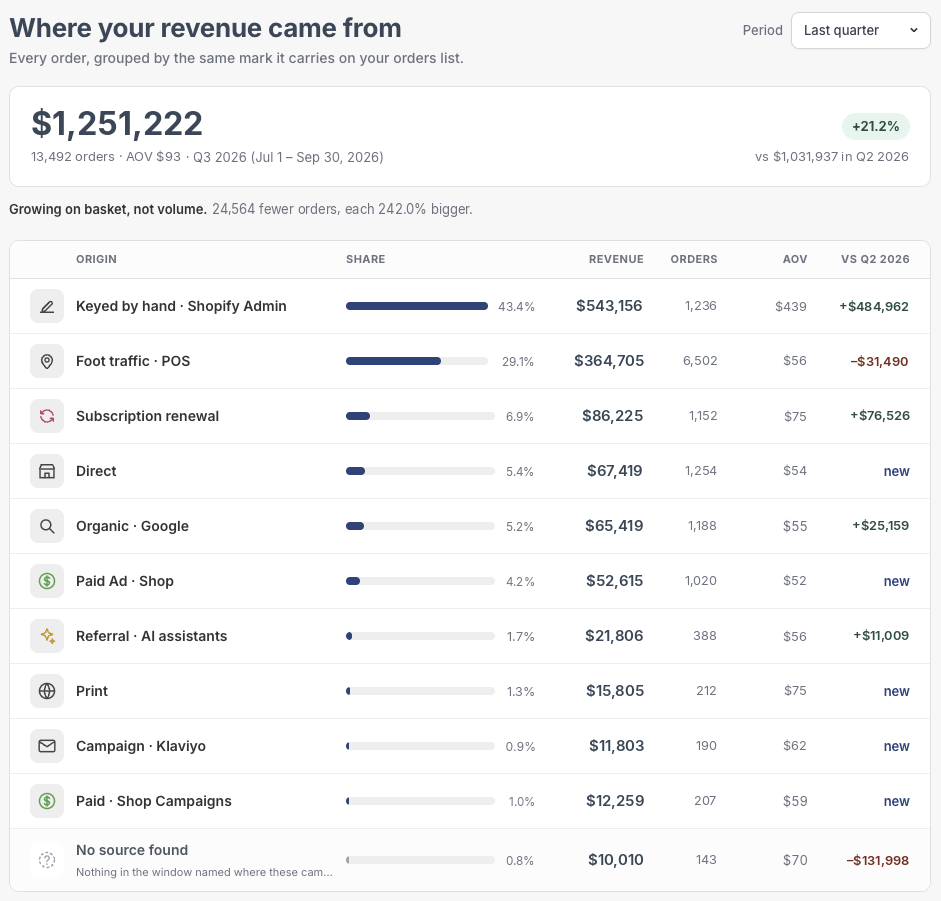
Subscription renewal orders now marked
Orders charged automatically by a subscription app now show a subscription renewal badge.
Orders that are billed automatically by your subscription app, with no checkout involved, now display a clear "Subscription renewal" badge with a circular-arrows icon in both the orders grid and the order panel.
This makes it easy to tell recurring subscription charges apart from first-time or one-off purchases at a glance, instead of them looking like untracked Direct orders.
Available onStartupBusinessCorporationEnterprise
FeatureTop Funnel
See branded vs non-branded search traffic
Monthly SEO reports now show how much of your search traffic already knew your brand name.
Your monthly SEO report now breaks down organic search clicks into branded and non-branded traffic, showing how much of your search visitors were already searching for your brand by name versus discovering you through other terms.
This split appears whenever a full revenue breakdown can't be calculated, giving you a clear read on brand awareness even when revenue attribution isn't available.
Available onStartupBusinessCorporationEnterprise
ImprovementOperations
One clear status for every order
Orders now show a single status instead of separate payment and fulfillment columns, with tabs to filter by stage.
Order statuses
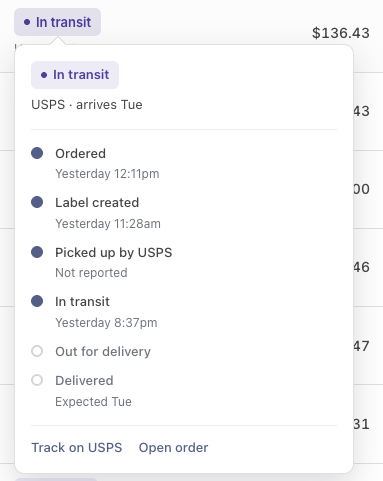
The orders list now shows one Status column instead of separate Payment and Fulfillment columns. Each order gets a plain-language status like "Payment failed," "Running late," or "Delivered," with a progress bar for partial deliveries and a hover card showing every step with dates, carrier, and tracking link.
New tabs above the list — All, Needs attention, Not started, In the warehouse, On the way, Delivered — let you jump straight to the orders that need you, with a red badge on Needs attention so problem orders never get lost in the list.
Available onStartupBusinessCorporationEnterprise
FeatureOperations
Bundle parts now show on orders
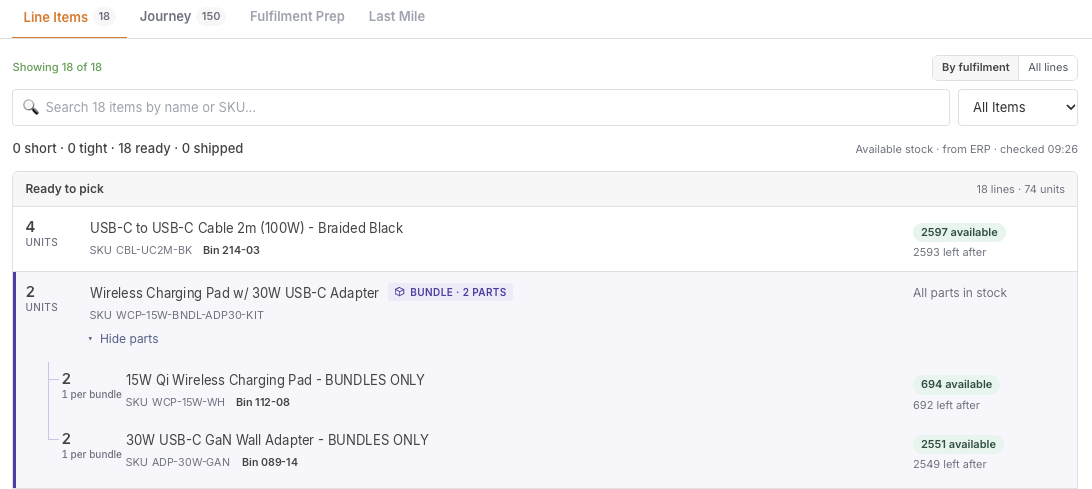
Orders, carts, and shipments show every part inside a bundled product, with its own stock level and bin location, now styled so bundles stand out clearly.
Product Bundles
Orders, carts, and shipments now show every part inside a bundled product, along with its own stock level and bin location. This gives you full visibility into what's inside each bundle without digging into separate records.
Bundle lines and their parts are now visually set apart with a distinct color and clearer spacing, so you can tell at a glance which lines belong together and read bundle contents more easily.
Available onStartupBusinessCorporationEnterprise
ImprovementSales
Merge duplicate customer records
You can now merge two customer records that are the same person, choosing which name and email to keep, undo it later, and see merged history in its own tab.
Merging customers
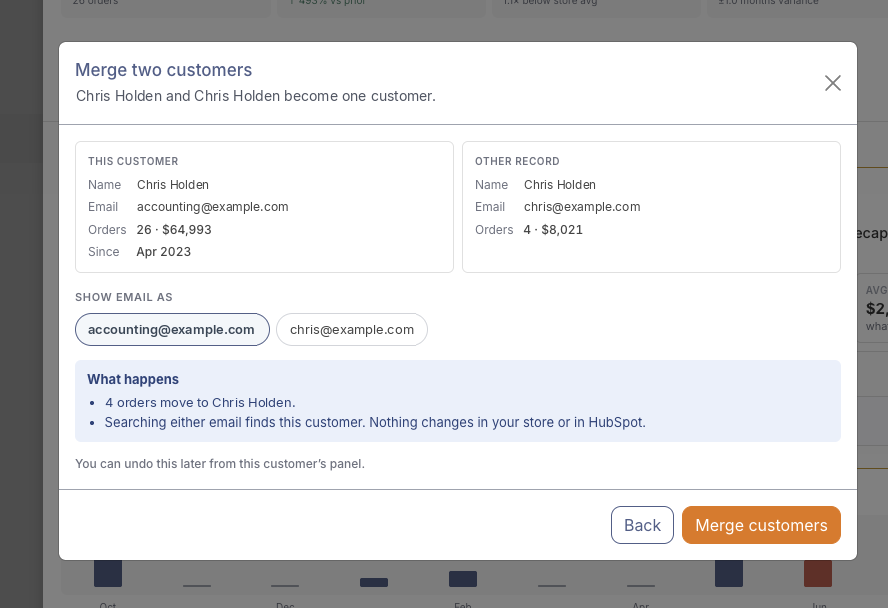
When you spot two customer records for the same person, you can merge them into one, choosing which name and email to keep, and undo the merge later if you need to. The merge window now dims the page behind it, and picking a record takes you straight to the comparison step instead of bouncing you back to search.
Merged history now has its own "Merged records" tab on the customer profile, showing how many records were combined into this one. You can undo a merge from that tab, and it falls back to Overview automatically if you lose access or undo the last merge.
Available onStartupBusinessCorporationEnterprise
IssueOperations
Alert settings now scoped to brand
Alert delivery channels, thresholds, and custom prompts for one brand no longer leak into or overwrite another brand's settings.
For multi-brand accounts, the alert configuration screen was reading and saving settings for whichever brand's connection happened to come first, so picking a Slack or Teams channel, setting a re-engagement threshold, or writing a custom AI prompt for one brand could silently change another brand's settings.
This is now fixed: everything you configure for a brand — delivery channel, re-engagement threshold, and custom prompt — is read from and saved to that brand only, and the AI actually uses the prompt you saved for that brand when writing alerts.
Available onEnterprise
ImprovementOperations
Per-brand pricing in product details
Product pages for multi-brand organizations now show each brand's own price, a combined inventory value range, and more accurate stock comparisons.
In Organization view, product details now show each brand's own price and currency instead of a single merged figure that could reflect whichever brand synced last. The inventory value shown is a single figure when all brands charge the same price, or a range when they differ, with a note if pricing is missing or currencies don't match. When a product has only one storage bin, it now gets its own tile next to available stock and inventory value for quicker reference.
We also fixed how stock levels are compared against your warehouse system: available units (on hand minus items already committed to open orders) are now used instead of raw on-hand counts, so items reserved for existing orders no longer show up as false stock mismatches.
Available onStartupBusinessCorporationEnterprise
FeatureOperations
Pick a website for Adobe Commerce stores
Magento stores that run multiple websites can now choose which website connects to each brand in IdealData.
If your Magento install runs more than one website, you can now pick which website connects to each brand you track in IdealData. The connection won't start syncing orders, carts, or products until you make that choice, and once set it's locked in to keep data from different brands from mixing together.
Saved integration keys are also never shown back in the connection form, so reconnecting or updating settings is simpler and safer.
Available onStartupBusinessCorporationEnterprise
FeatureOperations
Live tracking for every shipment
Orders now show real-time carrier tracking and delivery progress for each shipment, plus a new way to pull in tracking for orders you already have, including from Adobe Commerce.
Live order tracking
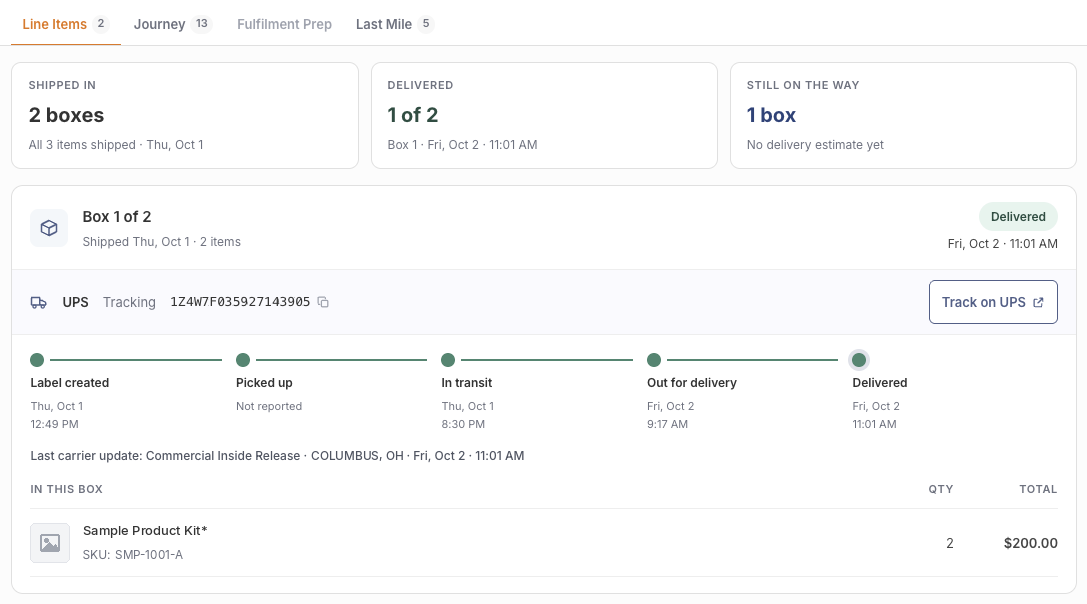
Every Shopify shipment on an order now shows its tracking number, carrier, and delivery progress. A new Shipments card lets you fetch tracking for orders you've already synced, choosing how far back to look (the available range depends on your plan). Adobe Commerce (Magento) stores now get tracking numbers and carrier details too.
This means you can spot delivery problems and answer shipping questions without leaving the platform. Because Adobe Commerce only tells us when a package has shipped, not how it's progressing, we only show the step-by-step delivery track and "Delivered / Still on the way" status where the platform can actually report it, so you never see a false delivery claim.
Available onStartupBusinessCorporationEnterprise
IssueSales
Correct variant names for Magento orders
Orders from Magento (Adobe Commerce) stores now show the correct product variant and options on each order line.
Orders placed on Magento (Adobe Commerce) stores now show the correct product variant — for example the specific size or finish — on each order line, along with its selected options, instead of showing duplicate or unlabeled lines.
This makes it easier to tell at a glance which variant a customer ordered when you're reviewing orders or preparing shipments.
Available onStartupBusinessCorporationEnterprise
FeatureBetaOperations
New Fulfillment Prep board
A new board groups paid, unshipped orders into shipments so your warehouse team always knows what to pack next.
The new Fulfillment Prep board groups all paid orders that haven't shipped yet into the shipments your warehouse team actually packs — one row per customer and address. Each row shows the carrier, how many orders and distinct products are in it, the item count, and a wait-time chip and colour (grey, amber, or red) so pickers can see at a glance what's been waiting longest.
This gives everyone building shipments a single, up-to-date view of what's ready to go out the door, without digging through the orders list order by order. The board is view-only for now — picking actions are on the way — but it already surfaces the carrier, product count, and wait time your team needs to plan the day.
Available onStartupBusinessCorporationEnterprise
FeatureTop Funnel
Traffic Sources page redesigned
The Traffic Sources page has a new layout and now correctly tracks orders placed through Shopify's Shop app.
Traffic sources and revenue
The Traffic Sources page has a new look that breaks down where your orders come from across four views — source, acquisition path, how shoppers found you, and sales channel — plus a growth summary, top movers, and a drill-down table you can group however you like.
Orders placed through Shopify's Shop app are now correctly credited to that channel instead of showing up as unattributed revenue, and advertising spend from Shop Campaigns is now included so you can see how that channel is performing alongside your other marketing.
Available onStartupBusinessCorporationEnterprise
IssueOperations
Owner filter now scoped to brand
The Owner filter on customers and carts now only shows reps from the brand you're viewing.
The Owner filter dropdown on your Customers and Carts pages previously pooled reps from every connected brand, so switching brands could still show owners who don't belong to it. That filter now respects the brand you have selected.
This means your team only sees the reps who actually work that brand, making it faster to filter and assign customers or carts correctly, especially for stores running multiple brands.
Available onEnterprise
IssueTop Funnel
Shop Campaign orders credited correctly
Orders placed through Shop App campaigns now show the correct campaign and are credited as paid instead of being shown as unpaid marketplace referrals.
Orders that came in through a Shop App marketing campaign were sometimes showing up as unpaid, generic marketplace referrals instead of being tied to the actual campaign. This happened because campaign tags on these orders don't always include the usual campaign label, so they weren't being recognized. This is now fixed, and we've also corrected historical orders that were affected by this.
This means your attribution and channel reports now reflect which Shop App campaigns actually drove sales, so you can trust the numbers when judging campaign performance.
Available onStartupBusinessCorporationEnterprise
ImprovementTop Funnel
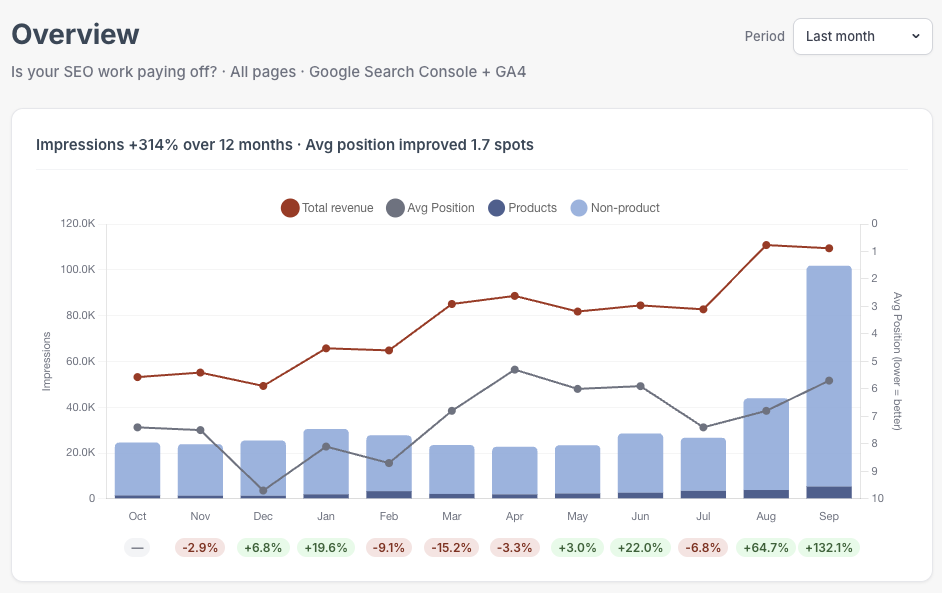
Revenue line added to Top Funnel chart
The Top Funnel Overview chart now includes a monthly net revenue line and clearer colors.
Revenue vs. impressions
The Top Funnel Overview chart now shows a monthly net revenue line alongside your traffic and ranking trends. The line appears on hover so it adds useful context without cluttering the chart.
We've also refreshed the chart's colors so each channel and the new revenue line are easier to tell apart at a glance.
Available onBusinessCorporationEnterprise
ImprovementSales
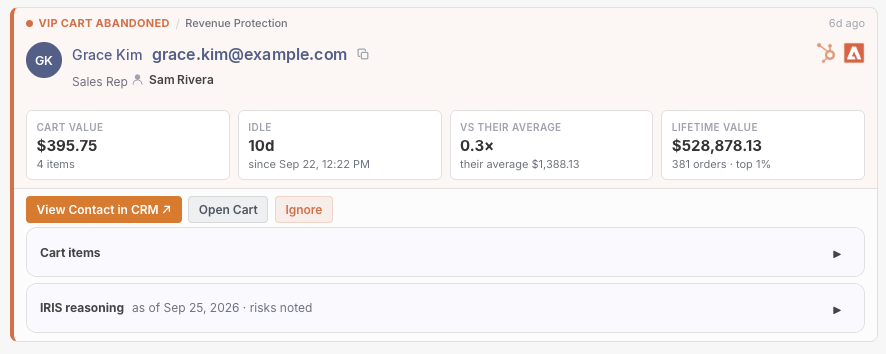
Cart abandonment alerts redesigned
High-value and VIP cart abandonment alerts now share a clearer, more consistent layout.
Abandoned card redesign
High-value and VIP cart abandonment alerts now use the same clean layout as your other alerts, with cart value, idle time, average comparison and lifetime value shown in simple tiles up front.
Cart items are now tucked into an expandable section so you can see the full cart when you need to, instead of being capped at the first ten items.
Available onBusinessCorporationEnterprise
FeatureTop Funnel
Executive summary shows full shopper activity
The monthly SEO report's executive summary now includes shopper activity across your brand and open baskets by source, with more accurate first-touch attribution.
Your monthly report's executive summary now shows a brand-wide view of what shoppers actually did — activity counts by type and channel — plus a breakdown of open baskets (abandoned and still-active carts) by the source that brought the shopper in.
We also updated how the report credits a shopper's first touch so it now matches what you see in the orders grid and order panel, keeping channel credit consistent everywhere you look.
Available onStartupBusinessCorporationEnterprise
FeatureSales
Richer order story from calls and emails
The order story now shows a complete narrative built from every call and email, including AI call summaries, and keeps the order panel and orders grid in sync.
The order story brings together your calls and emails into one clear narrative on each order, including AI-generated call summaries. It also keeps what you see in the order panel in sync with what shows on the orders grid, so the story is consistent everywhere you look.
We also fixed an issue where only the very first email or text with a customer was being kept — every message after that was silently dropped. Now every email and text is saved and included in the story, so your full conversation history is always there.
Available onStartupBusinessCorporationEnterprise
IssueSales
Call orders show correct channel
Orders that started from a phone call now show the correct marketing channel instead of unknown.
Orders whose first contact was a phone call used to show an unhelpful "unknown" label on the order's channel badge, even though the call itself was correctly labeled further down the page (for example "Paid · Google Ads"). The order's channel badge now always matches what the call was actually tracked as.
This gives you one consistent answer for how an order came in, whether you're looking at the top-level channel badge or the call details underneath it.
Available onStartupBusinessCorporationEnterprise
IssueTop Funnel
Fixed missing cart activity tracking
Guest checkouts are now reliably linked to the shopper's full browsing history for accurate journey and conversion tracking.
When a shopper checked out as a guest and their order finished syncing before we could match it to their browsing session, that cart's full browsing trail was sometimes silently dropped from journey and conversion tracking. This matching gap is now closed.
Every guest checkout is now linked to the right browsing history, so you'll see fewer missing carts and more complete attribution and order stories.
Available onStartupBusinessCorporationEnterprise
FeatureSales
HubSpot calls now included in customer history
Calls logged in HubSpot now show up alongside your other call records.
If you log calls in HubSpot, they now appear in the same call history as calls from your other connected sources, with duration, direction, and recording link where available.
This means you no longer have to check two places to see a customer's full call history — HubSpot calls and your other tracked calls now live together in one record.
Available onStartupBusinessCorporationEnterprise
FeatureTop Funnel
Calls now count toward attribution
Phone calls from people who weren't yet customers are now kept and credited to their orders instead of being thrown away.
Previously, if someone called your store before placing an order, that call — and the marketing journey behind it — could be discarded entirely. Now those calls are kept, and as soon as the caller places an order, the call is automatically linked and the order is credited to the right channel, such as a paid search or ad campaign.
When a caller's phone number doesn't match any customer, we also use their browsing activity to connect the call to the right visitor, so fewer calls are lost to attribution.
Available onStartupBusinessCorporationEnterprise
IssueTop Funnel
Call milestones now tracked accurately
Fixed a bug that left call-based first and last touch dates blank, and added two more tracked call milestones.
We fixed a bug that caused the first touch and last touch dates on call-based journey entries to never be recorded, so they could appear blank in customer journeys.
Call journeys now also track two additional milestones — lead created and qualified — giving you a fuller picture of how phone calls move through your funnel.