IdealData

What's new in IdealData

New features, improvements and fixed issues, as they reach your account.

114 updates in total

Issue Top Funnel

Call milestones now tracked accurately

Fixed a bug that left call-based first and last touch dates blank, and added two more tracked call milestones.

We fixed a bug that caused the first touch and last touch dates on call-based journey entries to never be recorded, so they could appear blank in customer journeys.

Call journeys now also track two additional milestones — lead created and qualified — giving you a fuller picture of how phone calls move through your funnel.

Available on Startup Business Corporation Enterprise

Feature Operations

Compare storefront and ERP stock by brand

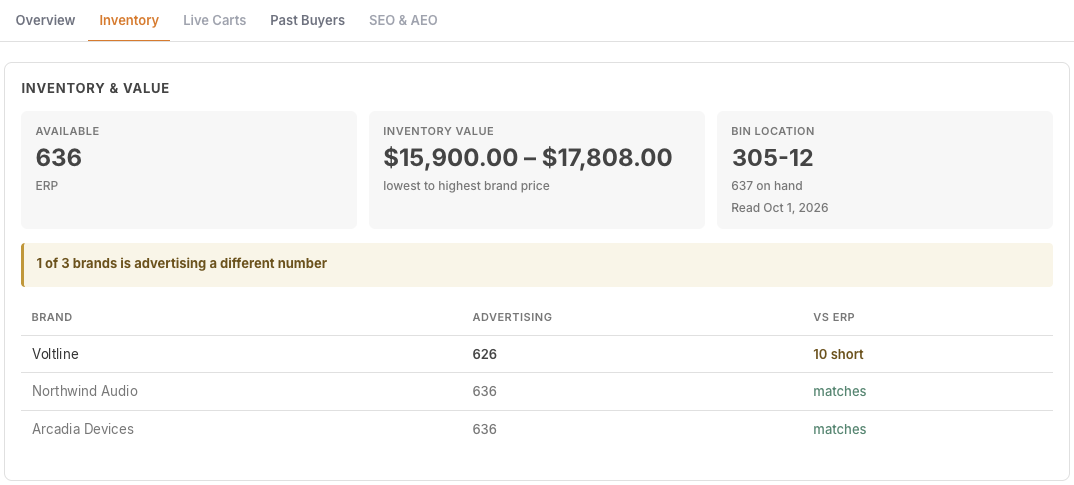
The product panel now flags when a brand's storefront stock count disagrees with the ERP, broken out per brand.

Inventory discrepancies

The product panel now compares what each brand's storefront reports for stock against what your ERP shows, and flags when they disagree. For stores running multiple brands, you can see which brand's count is off and by how much, sorted with the biggest gaps first.

This makes it easy to spot a sync problem before it causes an overselling or stockout surprise, instead of only seeing one merged number that hides which channel is wrong.

Available on Startup Business Corporation Enterprise
Issue Operations

Clearer notices on the access screen

The access management screen now shows plain-language notices about what brand-limited team members can and cannot access.

When you give someone access limited to specific brands, the access screen now shows a clear statement of exactly what they can't reach because of that limit, instead of a vague warning banner.

We also clarified a couple of labels on that screen: "People and access" is now "Users and access", and the invite option reads "Invite and remove users" so it's not confused with your customer records.

Available on Startup Business Corporation Enterprise
Feature Sales

Private Slack alerts to assigned reps

Customer alerts can now be delivered as a private Slack message to the assigned sales rep instead of only posting to a shared channel.

Cart abandonment, re-engagement and similar customer-specific alerts can now be sent directly to the assigned rep as a private Slack message, in addition to your shared channel.

This only happens when the rep has permission to see that alert and is present in the brand's Slack workspace; otherwise the alert still posts in the channel as before, so nothing is missed.

Available on Startup Business Corporation Enterprise
Improvement Top Funnel

Accurate cart origin on every platform

Carts now show the same accurate origin and channel information as the rest of the customer journey, no matter which platform the store runs on.

Cart records now pick up where a shopper actually came from using their own store visit, the same rule we already use to credit orders. Previously this only worked reliably on one platform, so carts on other platforms showed no origin, or showed a generic label like "Organic" even when the shopper arrived through a paid ad.

Now every cart shows a clear channel and, where relevant, the ad platform (for example "Paid · Google Ads"), matching what you see on the cart's journey timeline. We've also updated older carts so this fix applies to your history, not just new activity.

Available on Startup Business Corporation Enterprise
Issue Operations

Clearer invitation acceptance page

Accepting a team invitation now takes you to a page that clearly confirms your status instead of signing you in silently.

Clicking the link in a team invitation email now opens a dedicated page instead of signing you in right away. The page tells you clearly which organization you're joining, and if something's off — the invite expired, was already used, or needs a new one sent — it explains exactly what happened and what to do next.

This replaces confusing dead-end messages that could show up when an email scanner opened the link before you did, so invited teammates always get an accurate, clear status.

Available on Startup Business Corporation Enterprise
Feature Operations

Build your own permission sets

Manage Access now assigns permission sets instead of fixed roles, and Enterprise accounts can build their own.

Custom permission sets

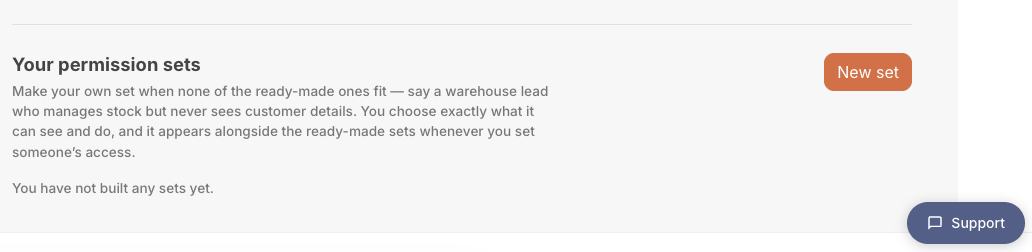
Manage Access now lets you assign permission sets to teammates instead of picking from three fixed roles. Each set spells out exactly what a person can do, so someone with view-only access no longer sees export or billing controls they can't use, and the Plans page shows which sets come with each plan.

On Enterprise accounts, you can go further: create your own permission sets from scratch, choose exactly which permissions each one carries, and assign them to teammates right alongside the standard sets.

Available on Enterprise
Issue Operations

Fixed inaccurate stock sync for Skubana

Skubana stock refreshes no longer overwrite the quantities of unrelated products.

When IdealData refreshed stock for specific products connected through Skubana, a mismatched filter meant the wrong products' quantities could get updated instead — potentially showing incorrect stock on products you never touched. This is now fixed so only the products you actually requested are updated.

If you connect your store through Skubana, your stock counts will now stay accurate after every refresh.

Available on Startup Business Corporation Enterprise
Feature Top Funnel

Capture signups from storefront forms

IdealData now captures submissions from more storefront forms, including newsletter and contact signups, as a new source of visitor activity.

Form submissions in customer journey

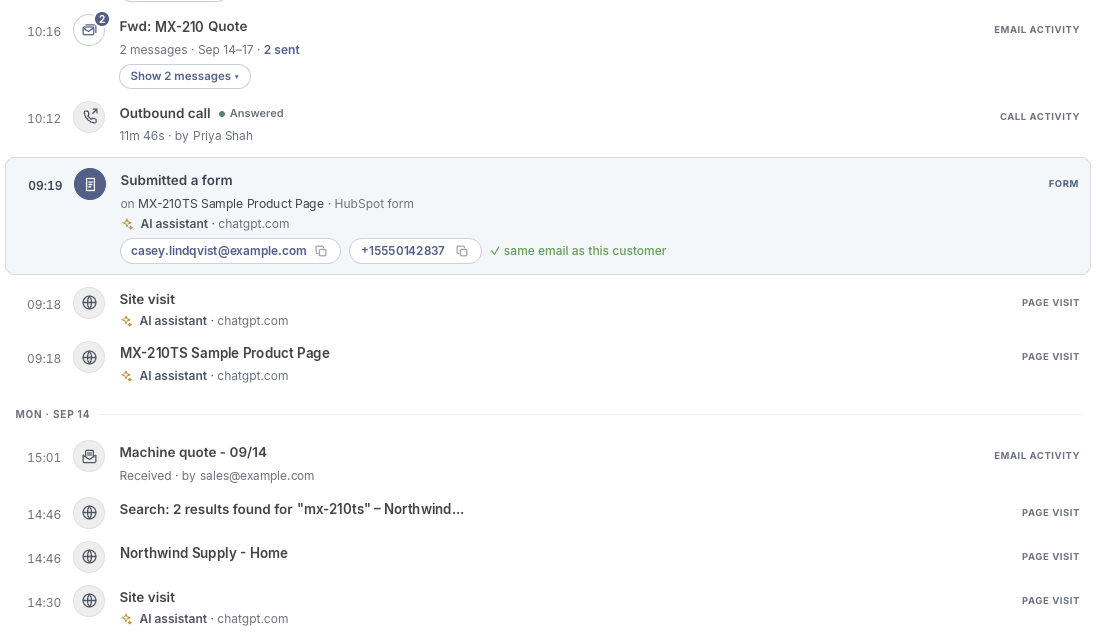
IdealData now picks up form submissions made on your storefront, such as newsletter signups and contact forms, and adds them to your visitors' activity history. This now also works with popular form apps like Klaviyo or HubSpot, so signups made through those tools are captured too, not just forms built directly into your theme.

This gives you a fuller picture of who is engaging with your store before they ever place an order, so you can see interest and intent earlier in the customer journey.

Available on Startup Business Corporation Enterprise
Feature Operations

Sign out of every session

You can now end every active sign-in session for your account from one place.

Sign out on all devices

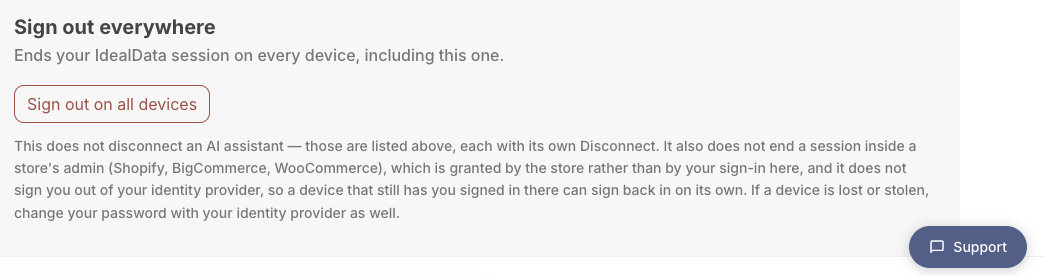
On your account page, right after your connected AI assistants, there's now a button to sign out of every active session for your account. It's the first thing to reach for if a laptop or phone with access to your account goes missing.

Keep in mind this only ends IdealData sessions — it doesn't disconnect any AI assistants (use the Disconnect option above it for that), and it doesn't sign you out of your identity provider, so a device that still holds a valid login there may sign itself back in automatically on its next request.

Available on Startup Business Corporation Enterprise
Feature Sales

New ways to resolve re-engagement alerts

Re-engagement alerts now let you set a reminder or close the alert with what happened, instead of a 'Customer Called' button that didn't save anything.

When a re-engagement alert needs a human follow-up, you now get two clear actions instead of one that didn't actually save anything: Remind Me, which sets a date to check back on the customer, and Close, where you record what happened — no answer, no longer buying, or left the company. Marking a contact as having left their company automatically updates their status on the customer record.

Resolving an alert this way also updates the message already posted in Slack or Teams, removing the action buttons so your team doesn't act on an alert that's already handled. We also loosened which customers can trigger these alerts — inactive or disengaged customers can still re-engage; only customers marked churned or departed are excluded.

Available on Startup Business Corporation Enterprise
Feature Sales

Sync B2B companies from Shopify

Shopify stores can now sync their B2B company accounts into IdealData, with contacts automatically linked to customer records.

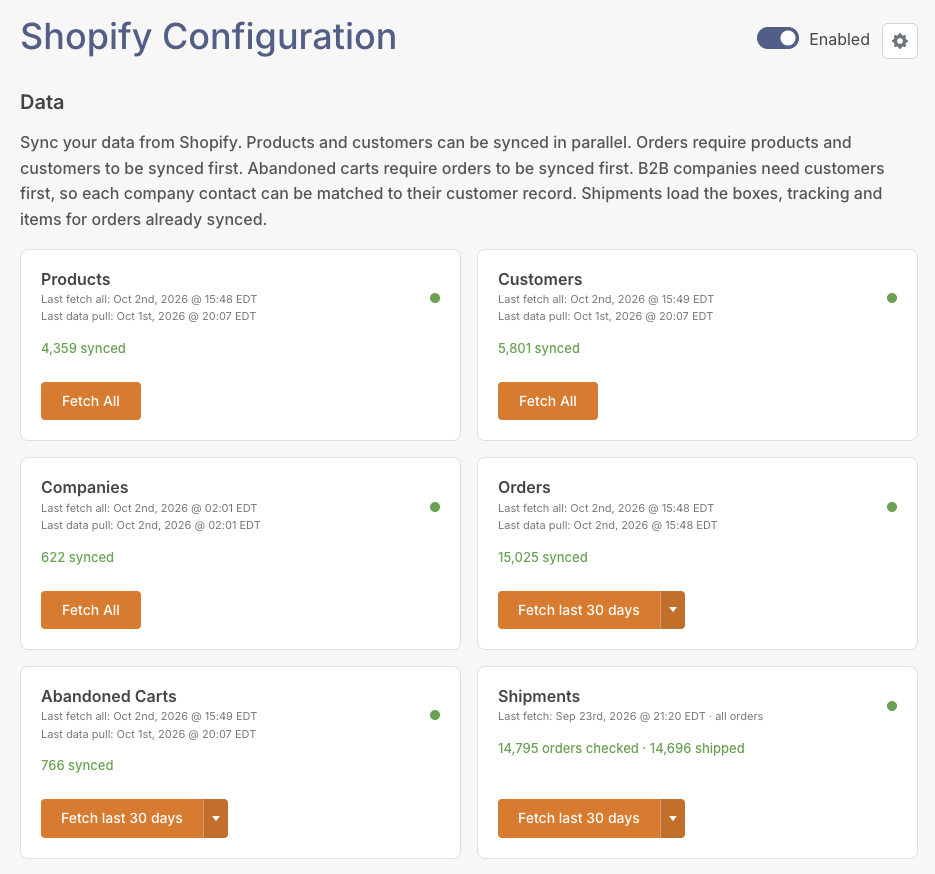
Shopify Companies are now supported

If you sell B2B on Shopify, you can now sync your company accounts into IdealData right alongside your regular customers, products and orders. Each company's contacts are automatically matched to their customer records once your customers have finished syncing.

This gives you a complete view of your B2B relationships without any manual matching, so you can see company-level activity alongside the rest of your store data.

Available on Corporation Enterprise
Improvement Operations

Alert recipients scoped to brand access

Team members now only appear as alert recipients for brands they have access to.

When choosing who gets notified about a signal, the team list now only shows members who actually have access to the brand that signal belongs to. On organizations with multiple brands, this stops you from accidentally picking someone who can't see that brand's data.

Store-wide signals like Low Stock and Late PO still list everyone across all your brands, since those aren't tied to a single brand.

Available on Startup Business Corporation Enterprise
Feature Top Funnel

Website visits now count in attribution

Orders and customer profiles now get credit for website browsing activity, not just phone calls, showing the true channel and first touch behind each sale.

Your orders and customer profiles now capture credit for website visits — ads, organic search, and other browsing activity — that led to a purchase, not just phone calls. We've also backfilled this credit onto your historical orders, so your attribution reports reflect the full picture going forward and looking back.

Customer profiles now show where each customer first found you, across every channel. Order attribution labels are also clearer: for example, an auto-tagged Google Ads link now shows as "Google Ads" instead of a raw web address, and repeat customers' full journey history is now viewable.

Available on Startup Business Corporation Enterprise
Feature Top Funnel

Order attribution icons now in grid

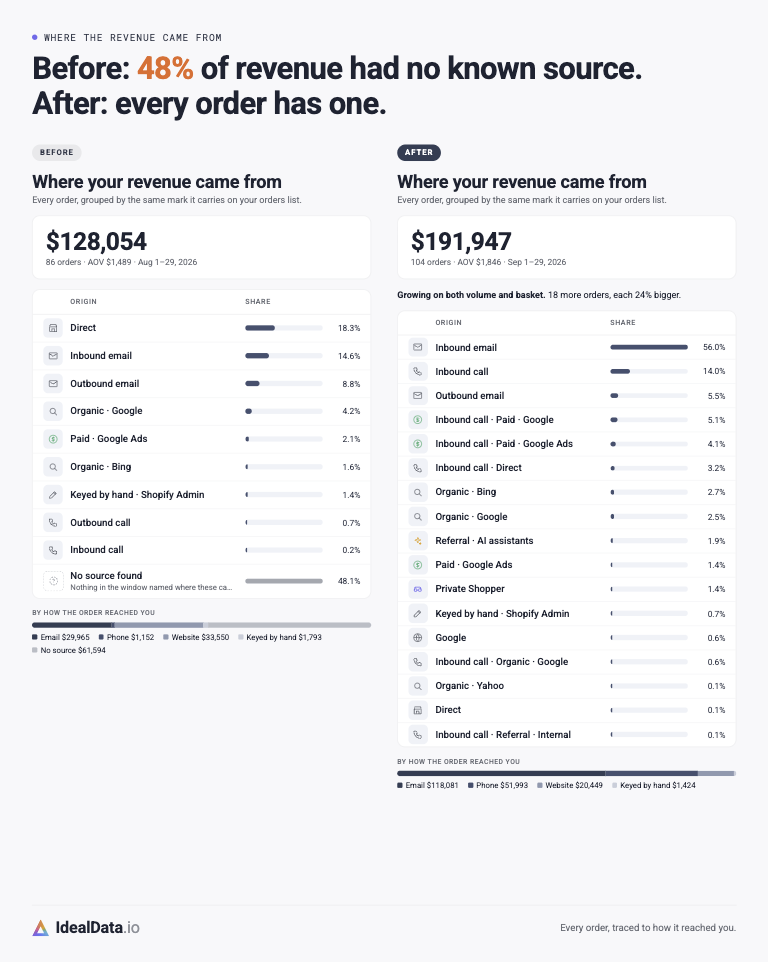
Order attribution now shows a clear channel icon in both the detail panel and the orders grid, with no more unknown sources mislabeled as Direct.

Order attribution
Order attribution

Every order now carries a distinct icon showing which traffic channel it's credited to, whether you're looking at the order detail panel or scanning the orders grid. Hovering over the icon shows the same channel detail card in both places, so you get a consistent answer wherever you look. Orders with no clear source are no longer mislabeled as Direct.

This makes it faster to see where your orders are coming from without opening every order, and keeps attribution accurate when a source genuinely isn't known.

Available on Startup Business Corporation Enterprise
Feature Top Funnel

Revenue shown with your currency

Page detail panels lead with revenue and order count, now formatted in your brand's currency when it's known.

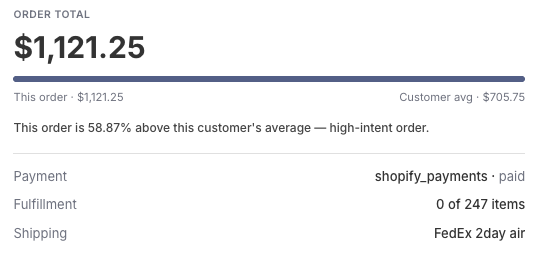
Order revenue
Order revenue

Page detail panels show revenue first, with the order count shown alongside it. Where your brand's currency is known, the revenue figure now displays with the right currency symbol instead of a bare number.

If your currency isn't known yet, or you're viewing a multi-brand organization, the figure simply shows as a plain number rather than guessing a currency, so you're never shown the wrong symbol.

Available on Startup Business Corporation Enterprise
Issue Top Funnel

Fixed missing first-touch attribution

A bug that left first-touch attribution data empty for customers tracked by our storefront pixel has been fixed.

A technical issue was silently preventing some visit information collected by our storefront pixel from being saved to a customer's profile, so their first-touch source sometimes showed up empty even though the visit itself was tracked correctly.

This is now fixed, so first-touch attribution fills in correctly going forward.

Available on Startup Business Corporation Enterprise
Feature Sales

Business health report in your AI assistant

Your AI assistant can now show a full business health report in a single answer.

Ask your AI assistant for your business health and get revenue, order count, average order value, and abandoned cart totals for any period, compared against the period before, plus a breakdown of your open alerts by type — all in one answer.

This replaces having to ask several separate questions to piece together the same picture, so you get a complete read on your store's performance right away.

Available on Startup Business Corporation Enterprise
Feature Beta Sales

Sync B2B companies from BigCommerce

BigCommerce stores with B2B Edition can now sync their company accounts into IdealData, including linking by company domain.

B2B company integration for BigCommerce

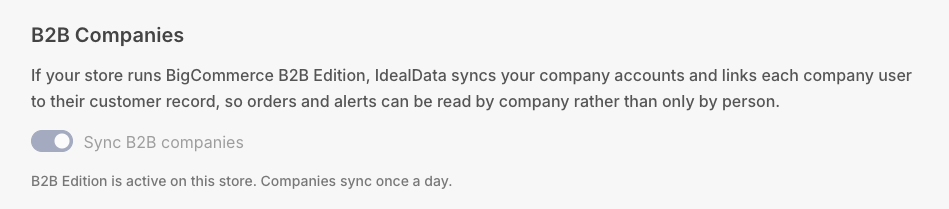
If you run BigCommerce B2B Edition, your company accounts now sync into IdealData automatically. We pull in each company's details, including a domain worked out from the company's email address, so personal email providers like Gmail aren't mistaken for a company.

That domain is also what lets customers be automatically linked to their company account, giving you a clearer view of who's buying as part of a business account.

Available on Startup Business Corporation Enterprise
Improvement Operations

Clearer sync status labels

The sync status shown on connection pages now uses clearer labels for what's happening with your data.

The timestamps shown on your connection and configuration pages now use clearer names: Last fetch all replaces "Last synced", and Last data pull replaces "Last change".

The underlying information hasn't changed, but the new names make it easier to tell at a glance whether we're still checking in with your store or whether new data has actually come through.

Available on Startup Business Corporation Enterprise
Improvement Operations

Rich tables in your AI assistant

Your AI assistant now shows orders, products, customers, and carts as readable tables, and jumps straight to a full detail view when a search finds just one match.

chatGPT AI cards
chatGPT AI cards

Your AI assistant can now show orders, products, customers, and carts as readable tables instead of plain text, whether you're working in Claude or ChatGPT. When a search for an order, product, or customer turns up exactly one match, you'll see that record's full detail card right away instead of a one-row table you'd have to click into.

This makes it faster to get a clear answer and act on it, whether you're scanning a list of results or looking for one specific record.

Available on Startup Business Corporation Enterprise
Feature Sales

Customers link to companies automatically

Customers are now automatically linked to their matching company account, even if they signed up before the company record existed.

When a company account is created or updated, any customers who belong to it are now linked automatically — even if those customers already existed in your account before the company record was created.

This keeps your B2B company and customer data connected without any manual matching, so company-level views and metrics include everyone who belongs to that company from day one.

Available on Corporation Enterprise
Improvement Operations

See real-time import progress

The import status shown during onboarding now explains whether we're still fetching your data or already processing it.

While your store is importing, the sync status now shows a clear "fetching" message with a wait-time estimate when we're pulling data from your platform, and switches to "X of Y items processed" once records start landing.

This gives a more accurate picture of what's happening during longer imports, especially for stores with large catalogs, instead of leaving the progress bar looking stuck.

Available on Startup Business Corporation Enterprise
Feature Beta Operations

New alert for late purchase orders

A new alert flags purchase orders that are past their promised delivery date, with a per-item cost breakdown, vendor contact details, and a projection of lost sales.

A new alert flags purchase orders that are running past their promised delivery date, so you can act before a stockout hurts sales. It breaks down exactly what's still owed, product by product: units overdue, cost to buy, projected profit, how many days late each product is, and vendor contact details so you can follow up directly.

The alert also projects the sales you stand to lose if the order never arrives and you have to reorder from scratch, giving you a real sense of what waiting costs. It now triggers as soon as an order becomes late during normal syncing, rather than waiting for the next daily check, so you find out sooner.

Available on Business Corporation Enterprise
Improvement Sales

Call customers from the cart list

Active cart lists now show customer phone numbers and a link to their CRM contact, so you can reach out without leaving the page.

When you're looking at active carts, you can now see each customer's phone number right in the list, along with a link straight to their contact record in your connected CRM.

This saves you from having to search for a shopper's details elsewhere when you want to call them or check their history while a cart is still active.

Available on Startup Business Corporation Enterprise